
Every November, thousands of candidates sit hunched over a phone screen, refreshing a page that will not load, typing a token marked "invalid," wondering if they just lost their money to a scam. If that is you right now, breathe. You are not doing anything wrong. The system has quirks nobody has ever explained to you in one place, until now.
I am Ebuka Ogudo. For over ten years I have guided Nigerian students through exams, admissions, and every bureaucratic process in between. I have sat beside candidates at cyber cafés in Minna, Owerri, and Lagos while they checked their NECO GCE results for the first time, watching exactly where the stress creeps in. This guide answers one question directly: how do you check your NECO GCE result online without stress in 2026?
You visit the official NECO result portal, log in or register, buy a result checker token through the Remita payment gateway, enter your examination number and exam year, select "SSCE External" (which is what GCE is officially called on the portal), and click "Check Result." That is the whole transaction. Everything else in this guide exists to make sure each of those five steps goes smoothly the first time.
What Is the NECO GCE and Why Getting This Right Matters
The National Examinations Council, known as NECO, is one of Nigeria's two major bodies (alongside the West African Examinations Council) responsible for conducting the Senior Secondary Certificate Examination. NECO GCE stands for NECO's General Certificate Examination - the external version of the SSCE, built for private candidates, repeaters, and adults not currently enrolled in secondary school but needing an SSCE certificate to apply to university, polytechnic, or for a job requiring five credits including English and Mathematics.
A mistyped examination number, a token meant for the wrong exam type, or a result pulled from a fake website can delay admission processing, create conflicting records with the Joint Admissions and Matriculation Board (JAMB), or leave you holding a result slip that NECO itself cannot verify. Treat the checking process with the same care you gave the exam.
NECO GCE vs NECO SSCE (Internal)
Candidates confuse these two constantly, and that confusion is exactly where "result not found" errors begin, because people select the wrong exam type on the portal.
SSCE Internal is for students who sat the exam through a registered secondary school in June/July. SSCE External, commonly called NECO GCE, is for private candidates who registered independently and sat the November/December diet. Both produce the same certificate and carry equal weight for admission, but they live under different categories on the result portal.
Exam Type | Who It's For | When | Token Needed |
|---|---|---|---|
SSCE Internal | School-enrolled candidates | June/July | Yes |
SSCE External (NECO GCE) | Private/adult candidates | November/December | Yes |
BECE | Junior secondary candidates | National entrance level | Yes |
NCEE | National Common Entrance Examination | As scheduled | Yes |
Gifted Examination | NECO's gifted and talented programme | As scheduled | Yes |
If you sat the GCE, always select SSCE External when you get to the exam type dropdown. Selecting "Internal" by mistake is one of the most common reasons candidates see an empty or incorrect result.
Before You Start - What You Need
Most panic happens because students open the portal before gathering what they actually need. Five minutes of preparation here saves you twenty minutes of frustration later.
Required Details
You will be asked for your NECO examination number (sometimes called your registration number), the exact year you sat the GCE, and the correct exam type (SSCE External). Your examination number is printed on your original registration slip or admission notification. If you cannot find it, check any SMS or email NECO sent you at registration, or contact the centre where you registered. Many GCE candidates register through accredited centres that keep records.
Devices That Work Best
You do not need a laptop. A basic Android smartphone with Chrome or the default browser works fine. A few habits make the difference between smooth checking and stalled attempts:
Use Chrome or Opera Mini in "high quality" rendering mode rather than extreme data-saving mode. The portal's form fields sometimes fail to load properly under aggressive compression.
Keep at least 10-15 naira of active data bundle. The portal itself is lightweight, but payment redirection through Remita can use more data than expected.
Avoid checking during peak hours right after results are announced, typically between 9 a.m. and 11 a.m., when millions of candidates hit the portal simultaneously.
Close other background apps before loading the page, especially on phones with 1-2GB RAM, to prevent the browser from crashing mid-payment.
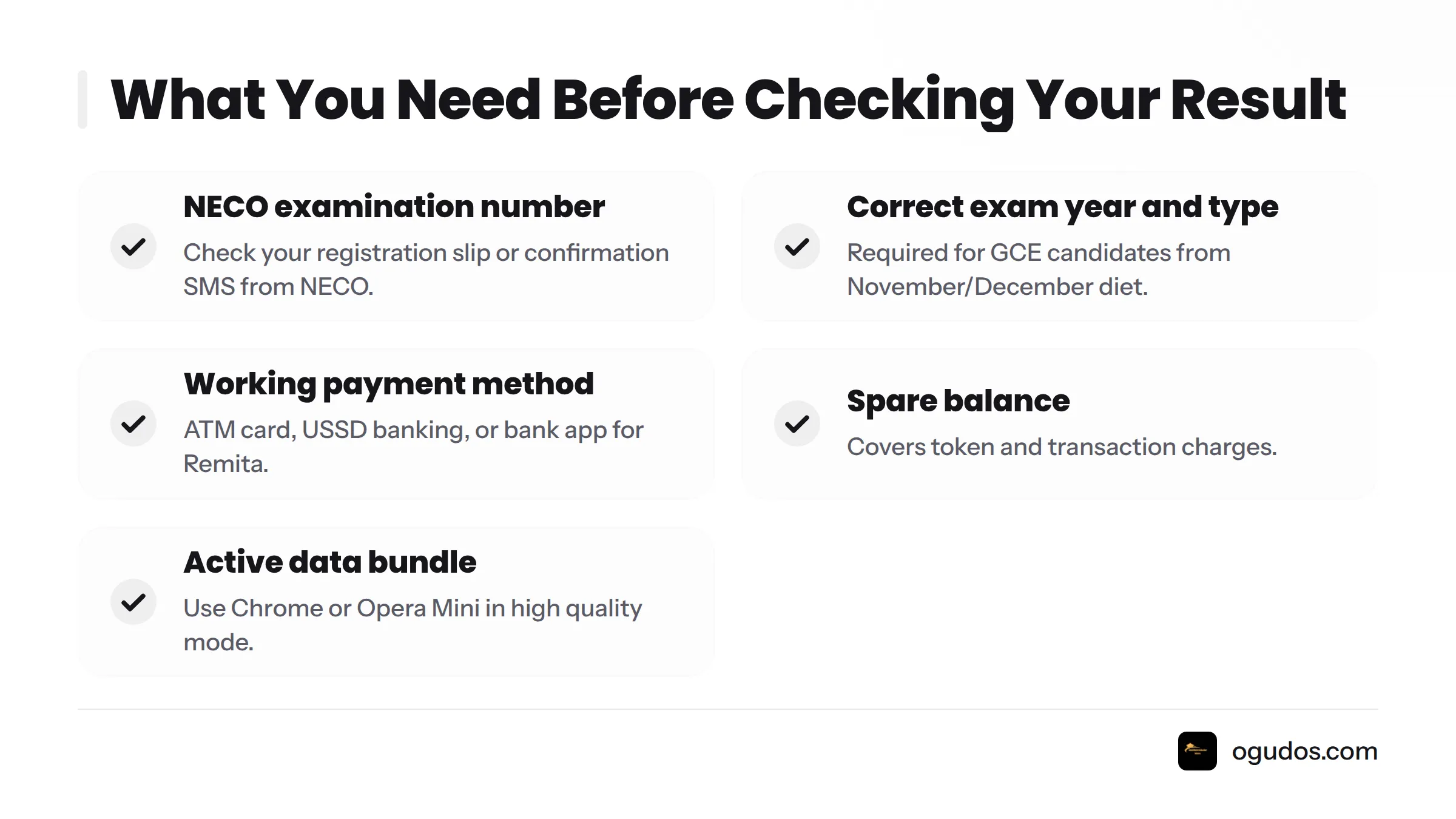
Five things to have ready:
Your NECO examination number
The correct exam year and exam type (SSCE External for GCE)
A working ATM card, USSD banking access, or bank app for Remita payment
100-200 naira of spare balance for the token and transaction charges
Stable network signal, even if data is limited
How to Check Your NECO GCE Result Online (2026)
Follow this walkthrough in order. Each step builds on the last.
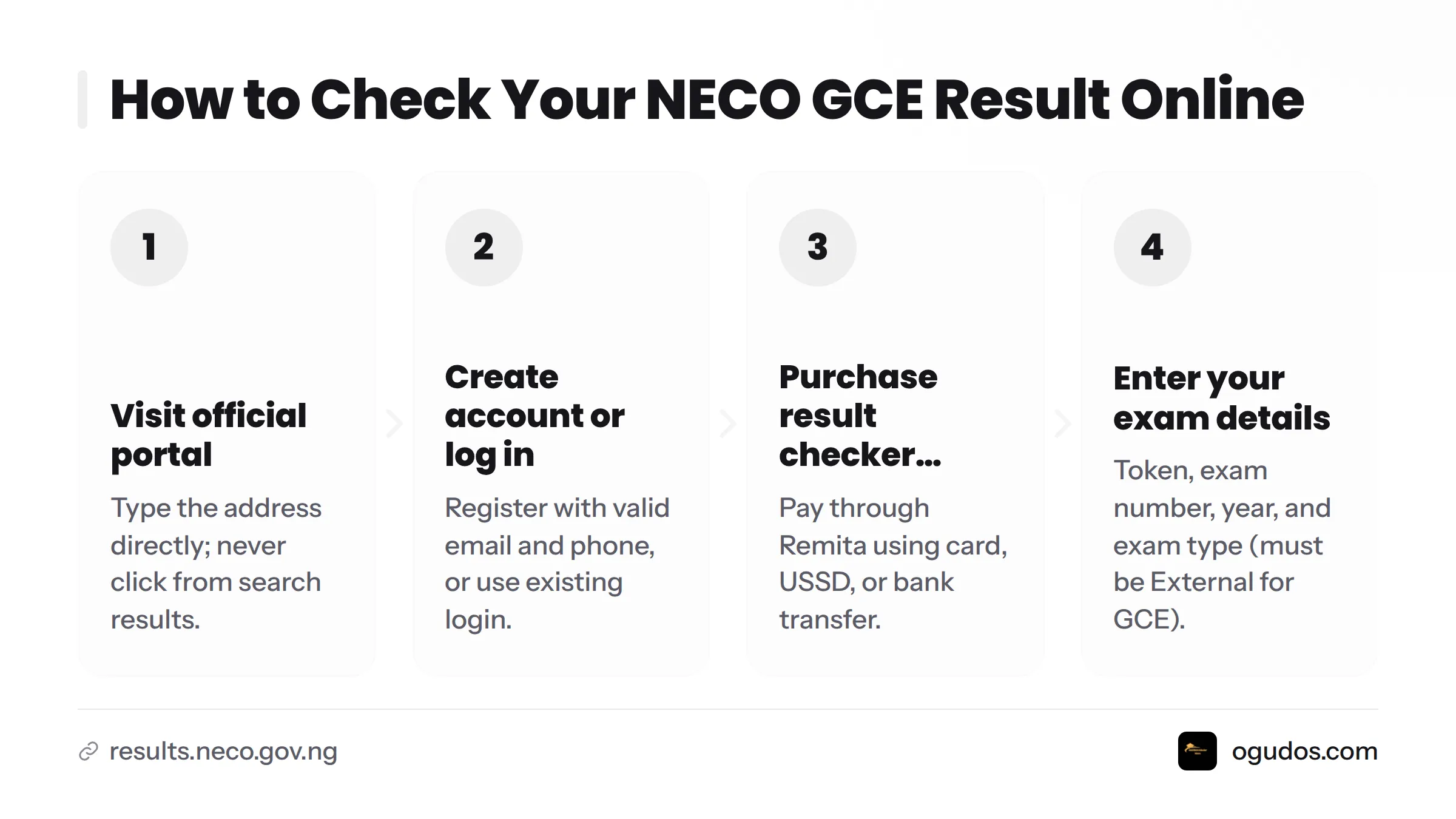
Step 1 - Visit the Official NECO Result Portal
Open your browser and type the address directly rather than searching for it. Search results sometimes show lookalike scam sites. The only official address is results.neco.gov.ng. Do not use "mynecoexams.com" expecting it to work as a live checker. It is a legacy name some older guides mention and not where current GCE result checking happens. If a site asks you to download an app to check your result, close it immediately.
Step 2 - Create an Account or Log In
First-time users register with a valid email address and phone number. The portal will ask you to set a password and may send a verification code by SMS or email. If you checked a NECO result before (for an earlier diet or different exam type), use your existing login rather than creating a duplicate account. Duplicate accounts are a common source of "candidate not found" errors later.
Step 3 - Purchase Your Result Checker Token
Inside your dashboard, find the option to buy a result checker token (sometimes still called a "scratch card" out of habit, though the physical card format has been phased out in favour of digital tokens). You will be redirected to Remita, the government-approved payment platform NECO uses for token purchases. Pay with a debit card, USSD code, or bank transfer, whichever your bank supports. Once payment clears, the token generates instantly inside your account. You do not need to wait for an SMS.
Step 4 - Enter Your Token, Exam Number, Year, and Exam Type
Go to the result checking section and fill in your token, examination number, exam year, and exam type. Double-check the exam year field especially. It defaults to the current year on some devices, which trips up candidates checking a previous diet's result.
Step 5 - Click "Check Result" and View Your Result
Click the "Check Result" button once and wait. Do not click it repeatedly if the page seems slow. Each click can register as a separate attempt and may burn through token uses unnecessarily. Give it 15-20 seconds on slower connections before trying again.
Step 6 - Download or Print Your Result Immediately
Once your result displays, save it immediately. On most Android phones, tap the browser menu and choose "Share" or "Print," then select "Save as PDF" to store it in your Files app. This protects you if your data disconnects right after viewing, which is a common second stress-point nobody warns candidates about. If you need a physical copy, take the saved PDF to any business centre for printing rather than trying to print directly from a cyber café browser, which sometimes garbles the formatting.
I once sat with a young woman in Owerri who checked her GCE result, saw her grades, closed the browser tab to celebrate with a phone call to her mother, and then could not get back into the page because her token had already been marked used. She had to buy a second token just to get a printable copy. Save or screenshot your result the moment it appears, before you do anything else, even celebrating.
Here is a video walkthrough showing this exact process on a mobile phone, which is worth watching if you prefer to see the screens in motion before you try it yourself.
How Much Is a NECO GCE Result Checker Token in 2026?
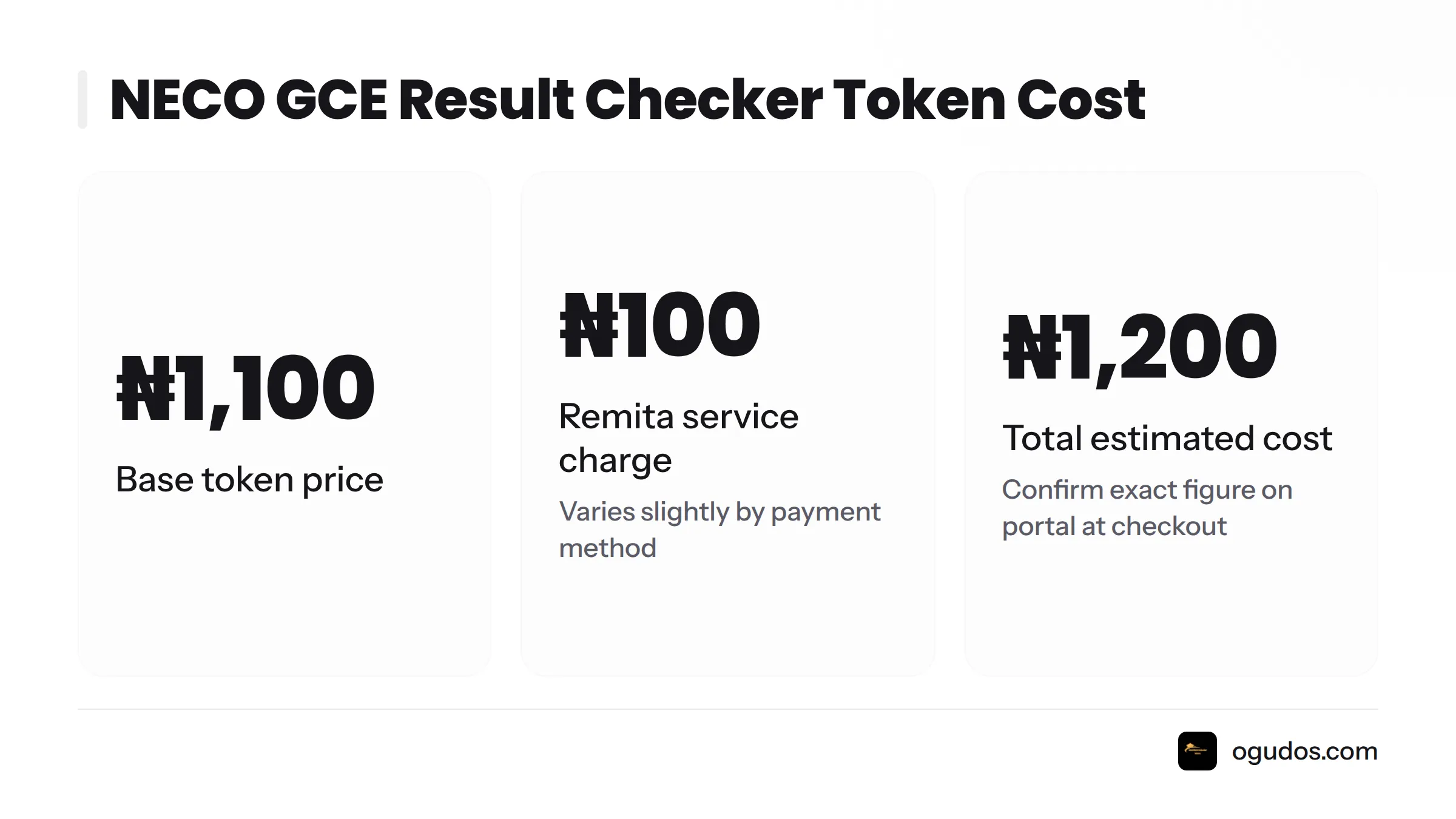
A NECO GCE result checker token costs ₦1,100 for the token itself, plus Remita's transaction charge, which typically brings the total to approximately ₦1,200 depending on your bank and payment method. This pricing has held steady across recent result cycles, but always confirm the exact figure on the portal at the point of payment, since NECO has adjusted pricing before without extensive public notice.
Item | Cost |
|---|---|
Base token price | ₦1,100 |
Remita service charge | ₦100 (varies slightly by payment channel) |
Total estimated cost | ₦1,200 |
Payment method | Remita (card, USSD, or bank transfer) |
Avoid any third-party website advertising NECO tokens at a steep discount or demanding payment via bank transfer to a personal account. NECO's only sanctioned payment route for result checker tokens is through Remita on the official portal.
How to Verify That Your NECO GCE Result Is Authentic
A NECO result checker token is a unique digital code, purchased once, that unlocks a single result-checking session on the official portal. NECO e-Verify is a separate authentication platform that institutions, employers, and candidates can use to confirm that a specific result is genuine and matches NECO's official database. This matters enormously once you start submitting that result for admission or job applications.
Using the NECO e-Verify Platform
Log in to the verification section on NECO's official site and enter the candidate's examination number along with the result reference details. The system cross-checks the record against NECO's central database and confirms whether the result is genuine, altered, or non-existent. Universities and NYSC often run this exact check before accepting a candidate's documents, so it is worth doing yourself before submission, catching any discrepancy early rather than during an admission screening.
Warning Signs of a Fake or Scam Result Checker Website
Treat the result-checking season like a minefield for scam sites. Fraudsters know candidates are anxious and in a hurry. Watch for these red flags:
The web address is not results.neco.gov.ng, even if it looks similar (extra letters, hyphens, or a different domain ending).
The site asks for your ATM PIN directly rather than redirecting you to Remita's secure payment page.
Spelling errors or broken layout on what is supposed to be a government portal.
Promises to "release your result instantly for half price."
Requests to send money to a personal phone number or individual account rather than a Remita transaction.
If anything about a site feels off, close it and type the official address manually instead of clicking a link from social media or a forwarded WhatsApp message.
Common NECO GCE Result Checking Problems and How to Fix Them
Nearly every candidate hits at least one of these snags. Here is what each one means and what to do about it.
Problem | Likely Cause | Fix |
|---|---|---|
"Invalid token" message | Token typed incorrectly, extra spaces, or token already used | Retype carefully with no spaces. If it still fails, contact NECO support before buying a new one. |
"Result not found" | Wrong exam type selected, wrong exam year, or examination number mistyped | Confirm you selected "SSCE External." Re-enter the exact year you sat the GCE and double-check every digit of your exam number. |
Site not loading or timing out | Server overload right after result release, or weak network signal | Try again after 30-60 minutes. Switch to a different network (Wi-Fi vs mobile data) or check during off-peak hours like late evening. |
Token already used or lost | Token was consumed on a previous check attempt, or the code was misplaced | Log back into your portal account. Used tokens are tied to your account history, so support can sometimes trace it. Otherwise a new token must be purchased. |
Payment deducted but no token generated | Network interruption during Remita transaction | Wait 30 minutes for automatic reconciliation. If the token still does not appear, contact your bank for a reversal and NECO support with your transaction reference. |
If none of these fixes work, reach out to NECO's customer care channels directly rather than trusting a random "agent" who contacts you promising to resolve it for a fee.
Checking Without a Smartphone or Stable Internet
Not every candidate has a reliable phone or data bundle, and that is completely fine. The portal itself does not care what device you use, only that the connection holds long enough to complete the transaction.
Checking at a Cyber Café or NECO-Accredited Centre
Cyber cafés remain a dependable option, especially in areas with inconsistent personal data access. Bring your examination number written down (not just memorized), a little extra cash for both the token purchase and the café's service fee, and arrive outside peak hours if possible. Ask the café operator to let you watch the entire process rather than stepping away, so you personally see your result and can confirm nobody records your login details.
Getting Help from a NECO Office
If a cyber café is not accessible either, NECO maintains a head office in Minna, Niger State, along with state offices across the country. Staff there can guide you through checking your result on-site. This route is particularly useful if you have lost your examination number entirely and need to confirm your identity through registration records first.
Offline Options Through NECO Centres
Beyond cyber cafés, NECO-accredited examination centres and some state Ministry of Education offices can assist candidates who registered through them, particularly for GCE candidates who sat the exam at that specific centre. Bring a valid ID and any registration documentation you have. This path takes longer than checking online yourself, often a day or more depending on the office's workload, so treat it as a backup plan rather than a first choice if you have any way to access the portal directly.
Frequently Asked Questions
How do I check my NECO GCE result online? Visit the official portal at results.neco.gov.ng, log in or register, buy a result checker token through Remita, enter your examination number, exam year, and exam type (SSCE External), then click "Check Result."
What website should I use? The only official website is results.neco.gov.ng. Any other domain claiming to be the "real" NECO checker should be treated with suspicion.
How much does a token cost in 2026? Approximately ₦1,200 total, made up of a ₦1,100 base token price plus a Remita transaction charge of roughly ₦100, though the exact charge can vary slightly by payment channel.
How do I pay for my token? Payment runs through Remita, NECO's official payment gateway, using a debit card, USSD banking code, or direct bank transfer.
What is the difference between NECO GCE and NECO SSCE? NECO SSCE Internal is for school-enrolled candidates sitting the June/July exam, while NECO GCE, officially labeled "SSCE External," is for private or adult candidates sitting the November/December exam. Both produce an equally valid SSCE certificate.
What should I do if my token is invalid? Retype it carefully, checking for extra spaces or mistaken characters. If the error persists, do not buy a new token immediately. Contact NECO support first to confirm whether the original token was already partially used.
What should I do if I lost my token? Log back into your portal account. Purchased tokens are tied to your account history and may still be visible there. If it genuinely cannot be recovered, you will need to purchase a new token through Remita.
How can I find my examination number? Check your original registration slip, any confirmation SMS or email from NECO, or contact the centre where you registered. Most accredited centres retain candidate records.
Why does my result say "result not found"? This almost always traces back to selecting the wrong exam type (Internal instead of External), entering the wrong exam year, or mistyping your examination number. Re-check all three fields carefully before assuming there is a problem with your actual result.
How do I verify that my result is authentic? Use the NECO e-Verify platform, which cross-checks a candidate's examination number and result details against NECO's official database to confirm the record is genuine.
What is the NECO e-Verify platform? NECO e-Verify is an authentication tool that institutions, employers, and candidates use to confirm a result's legitimacy directly against NECO's records, separate from the standard result-checking token process.
Can I check my result without a smartphone? Yes. Any device with a working browser and internet connection works, including desktop computers at cyber cafés or NECO-accredited centres.
Can I check my result at a cyber café? Yes, this is a common and reliable option, particularly for candidates without personal data access. Bring your examination number written down and enough cash for both the token and the café's service charge.
How do I download or print my result? Once the result displays on your screen, use your browser's "Print" or "Share" option to save it as a PDF immediately, before closing the page. Print that PDF at any business centre if you need a physical copy.
What exam types can I select? The portal lists SSCE Internal, SSCE External (GCE), BECE, NCEE, and the Gifted Examination. GCE candidates must select SSCE External.
How long does it take for results to be released? NECO typically releases GCE results within a few months of the November/December sitting, though exact timing varies by diet. NECO announces release dates through its official channels and press statements.
What do I do if the portal is not loading? Wait 30 to 60 minutes, especially right after results are first announced when server traffic peaks. Try switching between mobile data and Wi-Fi to see which connection holds steady.
Is there a free way to check my result? No. NECO requires a paid result checker token for every result check. This fee funds the examination council's verification and portal maintenance systems, and there is currently no free checking option.
Can I check last year's result using the same portal? Yes, the same portal and login handle multiple exam years. Just make sure you select the correct exam year for the result you are trying to check, since the portal will not automatically guess it for you.
What happens if I enter the wrong year or exam type? You will almost certainly receive a "result not found" error, even though your actual result exists correctly under the right year and type. Correcting those two fields resolves the vast majority of these errors.
How do I create an account on the portal? Provide a valid email address and phone number, set a password, and complete any SMS or email verification the portal requests during registration.
Where can I buy a token offline? NECO-accredited centres, some state Ministry of Education offices, and in certain cases designated bank branches can assist with token purchase for candidates without online payment access.
How do I know if a website is fake or a scam? Check the exact web address against results.neco.gov.ng. Be suspicious of any site asking for your ATM PIN directly instead of redirecting to Remita. Avoid any page promising discounted or "instant" results for an unofficial fee.
Can I use my result for NYSC or university admission directly? Many institutions accept the printed result slip during initial processing, but you will eventually need your original NECO certificate for full verification, particularly for NYSC mobilization and final admission clearance. Begin the certificate collection process as soon as your result is confirmed.
Final Steps
Treat the whole process as five small decisions rather than one big intimidating task: confirm the right website, gather your details before you start, choose SSCE External if you sat the GCE, save your result the second it appears, and verify it through e-Verify before submitting it anywhere important. Candidates who follow that order rarely run into trouble.
If you are still unsure where to start, or you want a second set of eyes on your admission paperwork once your result is confirmed, Ogudos Scholars exists for exactly that reason. We walk Nigerian students through every stage of the exam and admission journey without the usual runaround. You worked hard for this result. Checking it should be the easy part.


Comments
Post a Comment