
Blessing wrote to me from Port Harcourt with a problem. She had a Tecno phone with 2GB of storage left and wanted to know if graphic design was possible for someone like her. No laptop. No budget. Just a determination to learn.
Two years later, she was designing flyers for wedding vendors and earning naira. That story repeats itself across my mentoring practice. I'm Ebuka Ogudo, and I've spent over a decade guiding Nigerian students into creative and tech skills. This guide is the exact path I walk beginners through, whether you're working from a phone, a cybercafé computer, or a laptop at home.
The direct answer: a beginner in Nigeria can learn graphic design for free by matching free tools to your device, learning core design basics before touching any software, completing three practice projects, building a portfolio on Behance or Instagram, and then approaching your first paying client. No bootcamp. No laptop required. Just a plan and consistency.
Why Most Beginners Fail (and How to Skip That Path)
Failure doesn't happen because graphic design is hard. It happens because people skip steps.
The pattern is predictable: a student jumps straight into software without understanding color or layout. They chase ten YouTube tutorials without finishing a single project worth showing a client. They treat the tool as the skill, when the skill is actually the thinking.
The sequence matters more than which software you choose. Follow the steps in order, and you build on each layer. Skip fundamentals and your logos become random clip art. Skip the portfolio and nobody believes you can actually design. But follow the path, and you give yourself a real shot at earning from this skill - something I've watched happen with students who started with literally nothing but a phone and a reason to learn.
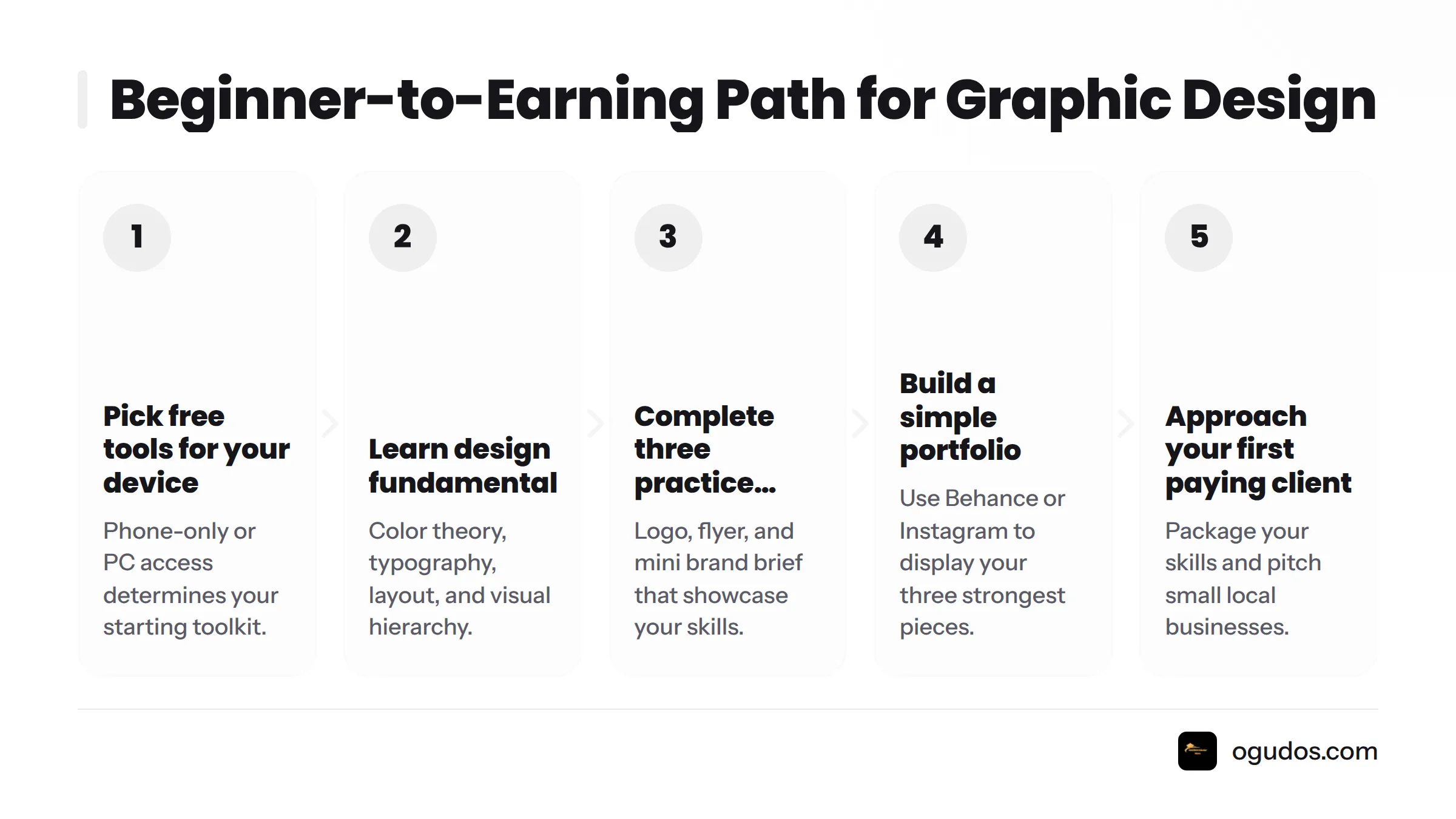
Here's the beginner-to-earning path:
Pick free tools that match your device (phone-only or PC)
Learn design fundamentals: color theory, typography, layout, visual hierarchy
Complete three practice projects: a logo, a flyer, a mini brand brief
Build a simple portfolio using Behance or Instagram
Package your skills and approach your first paying client
If you're weighing graphic design against other income skills, consider how graphic design compares with other high-income options for Nigerian students before committing your time.
Step 1: Choose the Right Free Tools for What You Have Right Now
You don't need a laptop. You need the right app for whatever device is in your hand today. I've verified every tool below for an active free tier as of this 2026 review, so nothing here is a "free trial that expires next week in disguise."
Free Tools for Smartphone-Only Learning
Most of my students start here, and it's a completely legitimate way to learn:
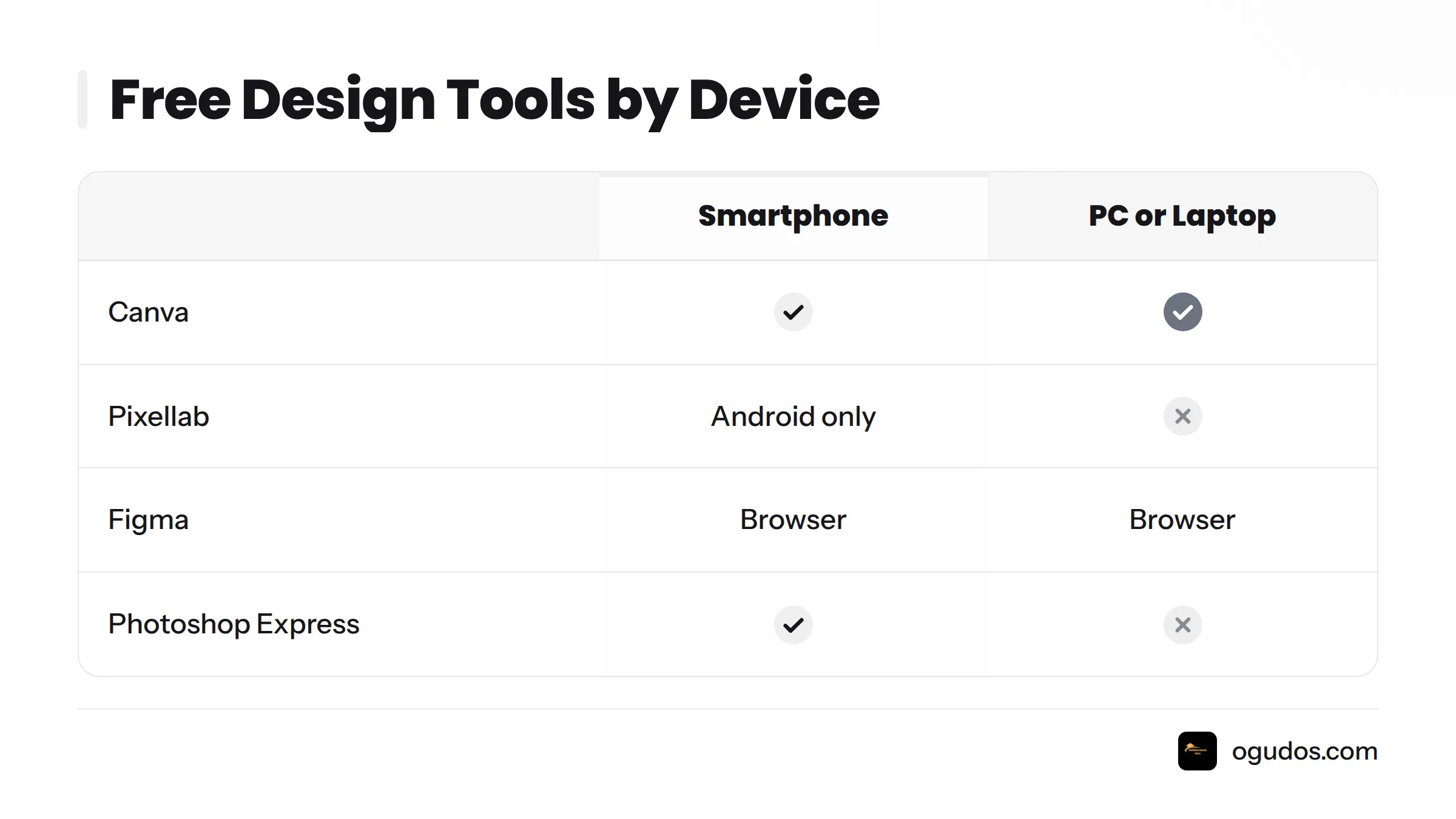
Canva mobile app: Free templates, drag-and-drop editing, a massive library of fonts and graphics. The free plan covers everything a beginner needs for flyers, social posts, and simple logos, confirmed on Canva's official pricing page.
Pixellab: A free Android app built for text-on-image work, perfect for practicing typography placement and flyer text effects.
CorelDRAW mobile viewer: Useful for viewing and annotating vector files, which matters once you start exchanging files with other designers.
Adobe Photoshop Express: The free mobile version of Photoshop. It won't replace the desktop app, but it teaches cropping, layering basics, and photo adjustment, confirmed on Adobe's official plans page.
Free Tools for PC or Laptop Access
If you have occasional access to a computer - at a cybercafé, a friend's house, school - these tools open up more serious practice:
Canva (desktop): Same free tier as mobile, with more canvas space for detailed layout work.
Figma: A free, browser-based design tool originally built for interface design, now widely used for social templates, presentation decks, and logo exploration. Its free tier includes unlimited personal files, per Figma's own pricing page.
Photopea: A genuinely free, browser-based editor that mimics Photoshop's interface almost exactly, no installation or account required for basic use.
GIMP: Completely free and open-source, installed on your computer, maintained by community volunteers, documented on GIMP's official site.
Tool | Device | Best For | Free Tier |
|---|---|---|---|
Canva | Phone and PC | Templates, social posts, quick logos | Free plan gives full core access; Pro adds premium assets |
Pixellab | Phone (Android) | Text effects, flyer typography | Fully free app with optional in-app purchases |
CorelDRAW mobile | Phone | Viewing and editing vector files | Free viewer; desktop app is paid |
Photoshop Express | Phone | Photo editing, cropping, basic layering | Free with limited premium filters |
Figma | PC (browser) | Layout practice, brand kits, vector shapes | Free tier includes unlimited personal files |
Photopea | PC (browser) | Photoshop-style raster and vector editing | 100% free in-browser, ad-supported |
GIMP | PC (download) | Advanced raster editing, photo manipulation | Free and open-source, no paid tier |
My honest advice: don't jump between five tools in your first month. Pick one phone tool or one PC tool and go deep before you go wide.
Step 2: Learn Design Fundamentals Before You Open Any Software
This is the step almost every beginner skips, and it's the single biggest reason their early work looks unfinished. Software is just a tool. Design thinking is knowing where to use it.
Color Theory in Plain Terms
Color theory is the study of how colors relate to each other and the emotional effect they create together. A beginner needs three things: one dominant color, one supporting color, one accent for emphasis. That's it. The common beginner mistake is using five or six colors with no relationship between them, which makes a design feel chaotic instead of clean.
Typography Basics Every Beginner Needs
Typography is the art of arranging text so it reads well and looks appealing. Here's a question I hear constantly: what's the difference between a typeface and a font?
A typeface is the design family - Helvetica, Montserrat, Georgia. A font is a specific weight and style within that family - Montserrat Bold Italic at 24pt. Beginners should limit themselves to two typefaces per project: one for headlines, one for body text.
Layout, Composition, and Visual Hierarchy
Visual hierarchy is the arrangement of design elements in order of importance, guiding the viewer's eye to what matters first. Four principles make this automatic:
Contrast: make important elements visually different from everything around them
Alignment: line up elements so the design feels intentional, not scattered
Proximity: group related items together, separate unrelated ones
Repetition: reuse the same colors, fonts, or shapes to create consistency
Why study basics before software? Because a beginner who understands hierarchy and contrast can make a plain Canva template look professional in ten minutes. A beginner who only knows button locations in an app will produce flashy but confusing work no matter how advanced the software gets. I've watched this dozens of times: students who spent their first week studying composition, not clicking buttons, caught up to and passed students who had a two-month head start on software alone.
For a structured introduction to this foundation, Envato's free graphic design basics course pairs well with this section.
Step 3: Build Three Practice Projects That Are Portfolio-Ready
Theory doesn't matter until you apply it. These three projects have been tested repeatedly with students and consistently produce work worth showing a client within two to three weeks of focused daily practice.
Project 1: A Simple Logo Design
Pick a fictional business - a small restaurant, a hair salon, a cleaning service - and design a logo using only text and one simple shape. No gradients, no complicated icons. The goal is to practice typography pairing and color restraint, not to create something elaborate.
Project 2: A Social Media Flyer Template
Design a flyer for a church event, a birthday, or a product sale. Start from a Canva template, then rebuild the layout yourself so you understand why each element sits where it does. This trains you on hierarchy and alignment in a format that Nigerian clients request constantly.
Project 3: A Mini Brand Design Brief
Write a one-page design brief for an imaginary client. A design brief describes the client's business, target audience, style preferences, and what they need designed. Then design two or three pieces based on that brief: a logo, a flyer, and a social media post that match in color and tone. This project proves you can follow direction, which is exactly what paying clients care about.
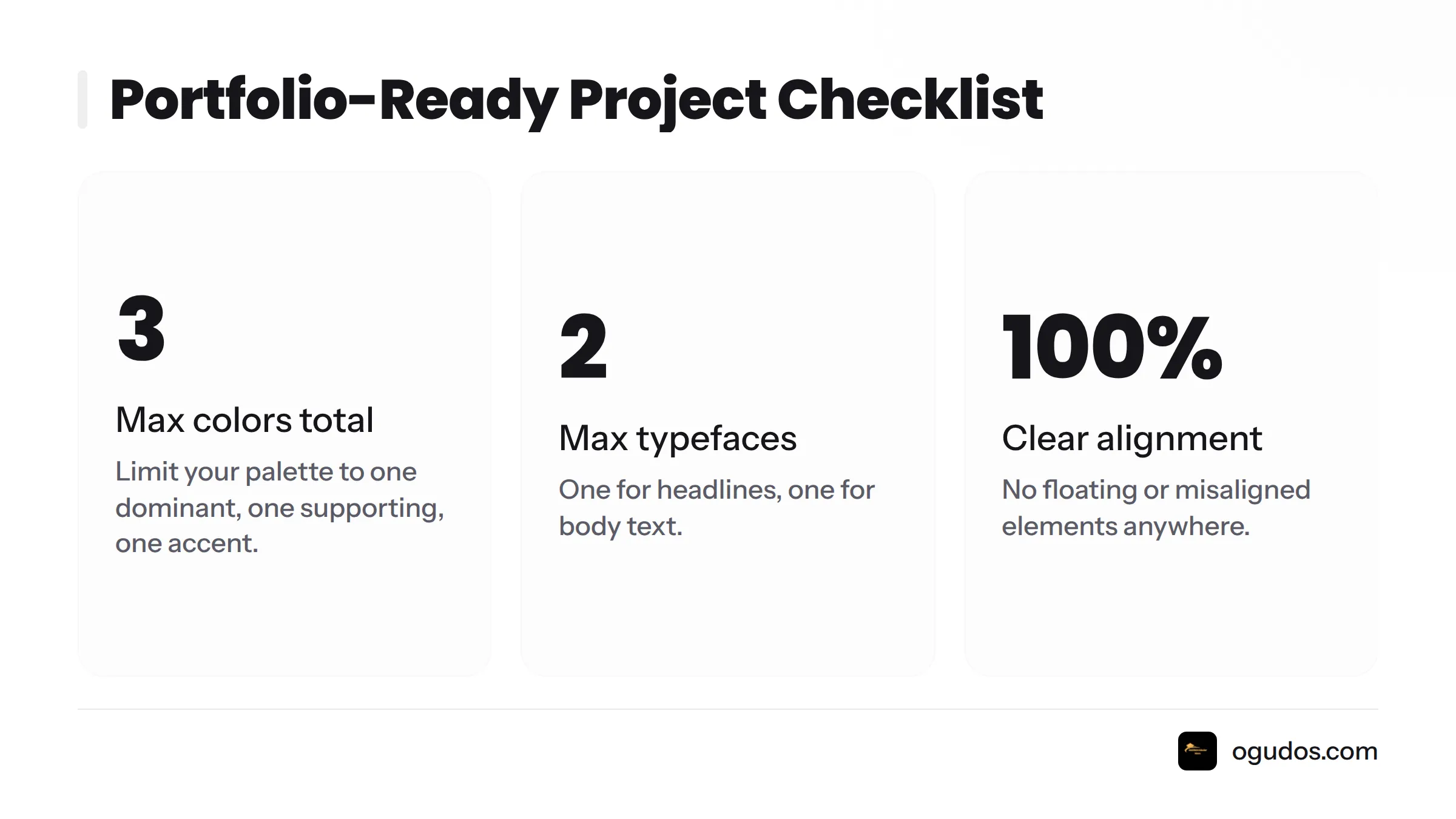
A portfolio-ready practice project meets these marks:
Uses no more than three colors total
Pairs no more than two typefaces
Shows clear alignment, with no floating or misaligned elements
Solves a specific, stated problem (not just "looks nice")
Can be explained in two sentences if a client asks "Why did you design it this way?"
Tony Ofoh's free beginner course walks through a similar project-based approach if you want a second perspective on structuring your first month of practice.
Step 4: Turn Practice Projects Into a Portfolio
Once you have three strong projects, don't let them sit in your phone gallery. A portfolio is what turns practice into proof.
Using Behance or Instagram as Your Free Portfolio
Behance is Adobe's free portfolio platform built specifically for creative work, and it's where many Nigerian designers get discovered by brands and agencies. Instagram works too, especially for local clients who prefer scrolling a familiar app than clicking an external link. My advice: use both. Post your three projects on Behance as a proper case study, then share the same work on Instagram with short captions explaining your thinking.
What to Include (and Leave Out)
Include only your best three to five pieces. A thin, strong portfolio beats a cluttered one every time. For each project, add one or two lines explaining the brief and your design choice. Leave out unfinished sketches, duplicate variations, and anything you copied directly from a template without changing the structure. Clients and employers can tell the difference between copied work and understood work almost instantly.
Step 5: Package Your Skills for Your First Paying Client
Before approaching a real client, practice receiving and writing briefs. When someone reaches out, ask them: What is the business? Who is this design for? What message should it communicate? Do they have existing colors or logos to match? Writing these answers down before you open any software saves hours of back-and-forth revisions later.
Once you can execute a brief cleanly, you're ready to pitch small local businesses or student organizations for your first paying gig. That conversation - how to find leads, price your work, and handle client feedback - deserves its own full guide. For now, focus on having work worth showing before you focus on finding who to show it to.
Common Mistakes Beginner Designers Make
I see the same handful of mistakes across almost every student I mentor. Here's how to avoid each one:
Skipping fundamentals entirely: Spend your first week on color, type, and hierarchy before opening any app.
Copying templates without understanding why they work: Rebuild one template from scratch, moving each element yourself to see how spacing and alignment change the feel.
Using too many colors or fonts: Cap yourself at three colors and two typefaces per project until it becomes a habit.
Chasing new tools instead of finishing projects: Commit to one tool for at least a month before trying another.
Never asking for feedback: Share your work in Nigerian design communities on Facebook or Twitter and ask specifically what to improve, not just "how is this?"
Building a portfolio with ten weak pieces instead of three strong ones: Delete anything you wouldn't want a real client to judge you by.
What Comes Next After Your First Paid Project
After you land that first paying gig, resist jumping to a completely different skill. Deepen what's already working: learn basic brand identity design, practice pricing with more confidence, and specialize in either social media design, print design, or logo and brand work. From there, many of my students explore adjacent free skills to diversify income, including video editing - a natural pairing since clients who need flyers often need short promotional videos too.
If you're still deciding whether graphic design is the right starting skill, browse the Ogudos Scholars homepage for more free, Nigeria-focused skill guides to compare, or check free online courses for Nigerian learners if you want structured lessons alongside this self-guided path.
Frequently Asked Questions
How can a beginner in Nigeria learn graphic design for free and start earning from it?
Match free tools to your device, learn color theory and typography basics, complete three practice projects, build a Behance or Instagram portfolio, then approach your first paying client.
What free graphic design tools work well on a smartphone?
Canva mobile, Pixellab, CorelDRAW mobile viewer, and Photoshop Express all have genuinely free tiers for beginners designing entirely from a phone.
Can I learn graphic design with just a phone and no laptop?
Yes. Canva's mobile app combined with Pixellab for text effects covers everything a beginner needs for logos, flyers, and social posts without a laptop.
What's the best free graphic design software for beginners?
Canva is the easiest starting point because of its templates and drag-and-drop design, while Photopea suits beginners who want a free Photoshop-style interface without installation.
Is Canva good enough to learn graphic design as a beginner?
Yes. Canva teaches core design skills like layout, color pairing, and typography. Serious designers eventually add tools like Figma or Photoshop for advanced control, but Canva is a complete starting point.
What design basics should I learn before using any software?
Learn color theory, typography basics, layout principles, and visual hierarchy. These fundamentals determine whether your software-made designs look professional.
What is color theory and why does it matter for beginners?
Color theory is the study of how colors interact and affect mood. Beginners who limit themselves to one dominant, one supporting, and one accent color immediately look more professional than those using clashing colors.
What's the difference between a typeface and a font?
A typeface is the overall design family (like Montserrat). A font is a specific style and weight within that family (like Montserrat Bold at 18pt).
What is visual hierarchy in graphic design?
Visual hierarchy is the intentional arrangement of design elements so the viewer's eye notices the most important information first, achieved through contrast, size, alignment, and placement.
What beginner projects should I practice first?
Start with a simple text-and-shape logo, then a social media flyer rebuilt from a template, then a mini brand brief covering a logo, flyer, and social post for one fictional client.
How do I design a simple logo as a beginner?
Pick a fictional business, choose one typeface and one simple shape, limit yourself to two or three colors, and focus on clarity over complexity.
How do I create a social media flyer template for practice?
Start from a Canva template, then rebuild its layout yourself, paying attention to why each text block, image, and color choice sits where it does so you understand the structure rather than just copying it.
What is a design brief and why should beginners practice writing one?
A design brief outlines a client's business, audience, and design goals. Practicing it teaches beginners to design for someone else's needs rather than only their own taste.
How do I build a graphic design portfolio with no prior experience?
Complete three strong practice projects, post them on Behance or Instagram with a short explanation of the brief and your decisions, and keep only your best work visible.
Should I use Behance or Instagram for my first portfolio?
Use both if possible. Behance signals professionalism to agencies and employers, while Instagram reaches local clients who prefer browsing familiar social apps.
What should I include in my first design portfolio?
Include three to five of your strongest projects with a short explanation of each brief and decision. Exclude unfinished work, duplicate variations, and uncredited template copies.
How long does it take to go from beginner to a first paid design job?
There's no fixed timeline, but students who follow fundamentals before software, then complete three focused projects, typically reach a portfolio-ready stage within a few weeks of consistent daily practice.
What common mistakes do beginner graphic designers make?
Common mistakes include skipping fundamentals, copying templates without understanding them, overusing colors and fonts, jumping between tools too often, and never seeking outside feedback.
How do I package my beginner skills to get my first paying client?
Build a focused portfolio of three to five strong projects, practice writing and responding to design briefs, and approach small local businesses or student organizations that need simple flyers or logos before targeting bigger clients.
Is graphic design still worth learning in 2026?
Graphic design remains a practical creative skill because nearly every business - from local vendors to large brands - needs flyers, logos, and social content. Weigh it against other options on a dedicated high-income skills comparison rather than relying on unverified demand figures.
Is there a free AI tool for graphic design beginners?
Canva's free plan includes limited AI-assisted features like background removal and basic image generation, giving beginners a taste of AI-assisted design without a paid subscription.
Can ChatGPT help with graphic design tasks?
ChatGPT can help beginners brainstorm design briefs, color palette ideas, and client messaging, though it cannot replace hands-on practice with an actual design tool.
What free tools does Figma offer for beginners?
Figma's free tier includes unlimited personal design files, basic prototyping, and access to community templates, making it a strong free option for beginners ready to move beyond template-based tools.
What should I learn after landing my first paid design gig?
After your first paid gig, deepen your core skills with basic brand identity work, practice pricing with more confidence, and consider specializing in social media design, logo and brand work, or print design before adding adjacent skills like video editing.
Graphic design rewards patience more than talent in the beginning. Start with whatever device you have today, finish your first three projects before worrying about anything else, and let your portfolio do the talking when you approach your first client. If you're ready to go deeper, explore the Ogudos Scholars homepage for more free, Nigeria-focused skill guides to pair with your new design foundation.


Comments
Post a Comment